
The inbox overhaul, start to finish. Getting years of mail out of the way, cutting the subscriptions that quietly refill it, then processing what's actually left. Whichever provider you're on, and whether you'd rather pay a tool to do it or do it by hand.
A complete digital organization system.
You just watched Less Clutter, Less Overwhelm, the training I recorded for Megan Sumrell's Plan-a-Palooza. That covers the mindset. This covers the step-by-step walkthroughs from one perspective. Go searching on YouTube and you'll find a bunch of great videos and tips, but they're not a system that works together. The Get Organized! Resource Library is the process we actually take our clients through and systems that we've been refining for years. And they work.
- Files
- Passwords
- Projects
- Six more areas
$98.80 for Plan-a-Palooza attendees, instead of $247 a year. Type PINKBEE into the coupon box at checkout.


How it works
It's a library, not a course.
You're not meant to watch all of these videos. Many won't apply to you, and that's OK.
Every area is laid out in order, so you always know what comes next. Those areas might have different versions of the next step. At each step you take the one that matches your setup and ignore the others.
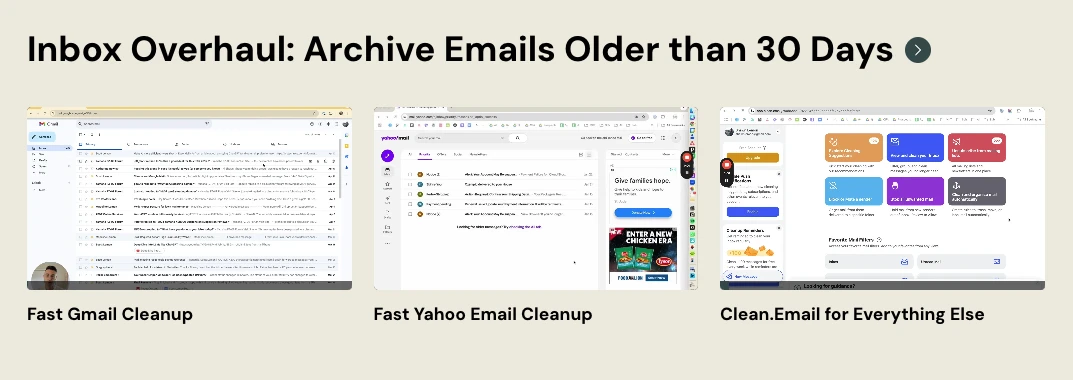
Cleaning out Gmail is a different video from cleaning out Yahoo. Clean.Email costs about ten dollars for the year and does the sorting for you. If you'd rather not pay, there's a video for doing the same job by hand. Archiving in place and running a deep archive are two different exercises.
The videos are there so that whatever your situation turns out to be, we have probably already covered it. And when we haven't, tell us. A good chunk of what's in there exists from member requests.
What's covered
The basics to advanced.
We don't learn a new way to work, implement the most advanced workflows, and expect to actually change your daily behavior from here on out. That's why so many people fail. We need to grow into this stuff. The basics are here and examples of more advanced setups. You grow into them when you're ready and you can request something that isn't already there.
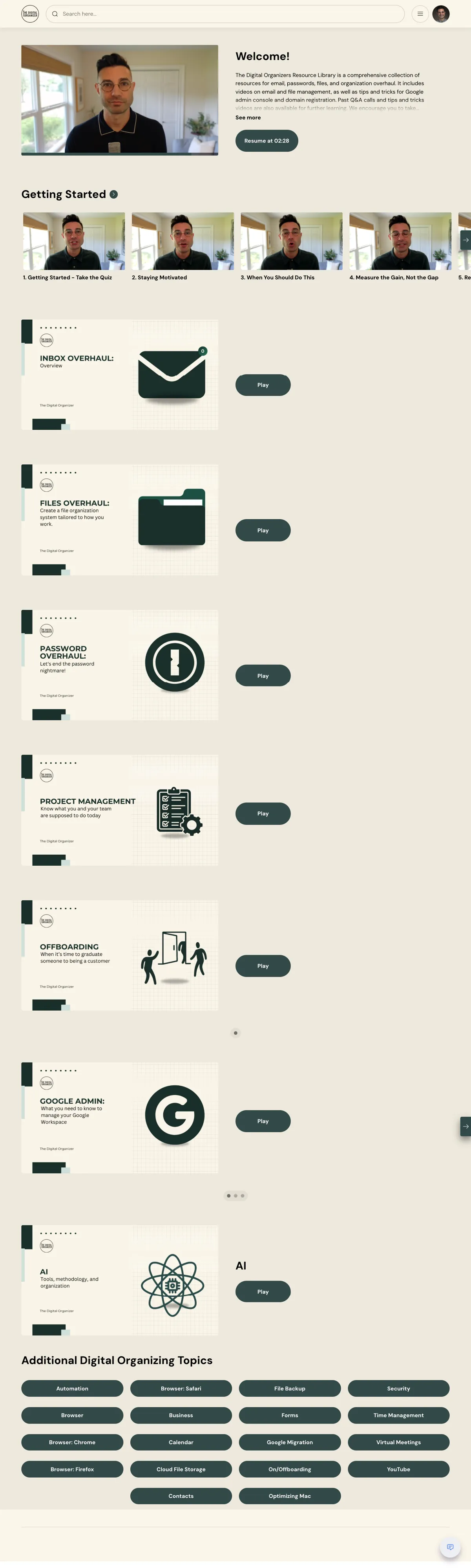
Files
Pulling everything out of the five or six places it currently lives, deciding what's worth keeping, naming things so you know what they are without opening them, and archiving the rest so what you see is what you use. Drive, Dropbox, or OneDrive.
Passwords
Getting them out of your head and out of the notes app, into one vault with the two-factor codes attached. Which manager to pick, importing whatever you've accumulated, and sorting out who else can see what.
Also in there
- Getting started. A short orientation, to work out which area is actually costing you the most.
- Projects and tasks. Building out Asana, and the to-do list system that sits underneath whichever app you land on.
- Google Workspace admin. For whoever ended up owning the console. Shared Drives, roles, sharing, closing accounts out.
- Calendars and contacts. Shared calendars, notifications that help rather than interrupt, recovering calendars that went missing.
- Domains and spam. Managing your domains, setting the email security records, and stopping people spoofing your address.
- Working with AI. Custom GPTs built around your own work, saved prompts, putting documents together with Gamma.
- Recorded Q&A calls. Full member sessions on scaling, tabs and browsers, and getting control of your Google accounts.
- A topic index. Go straight to automation, backups, security, or whichever browser you live in.
Ask questions
The part a course normally can't do.
Near the end of the training I said the hard thing about courses is that you can't ask them questions. So we built something that answers.
It's trained on the questions our coaches ask real clients, the ones we use to work out what's actually going on before recommending anything. There are a lot of different ways to do this and the right one depends on your situation, your tools, and what you actually care about.
So when you hit the point where the video almost matches your setup but not quite, you describe what you're looking at and it walks you through it. It knows the whole method, and it will tell you which videos to watch and in what order. Access comes with the library. Join and it's there.
The kind of thing people ask it
- Which area should I start with, given how my week actually goes?
- I'm on Dropbox and the videos show Drive. What changes for me?
- My team shares one login for everything. Where do I even begin?
- I got through email. What's the sensible next thing to fix?
Proof
What people say.
From members, clients, and podcast hosts who went through it.
My mind is still blown. You gave us very simple, foundational steps that will start moving the needle and remove that overwhelm.
The StoryBrand Podcast Episode #181. Their team had the library before we recorded.
Digital declutter experts Shawn and Scotty helped me to remove unnecessary friction from my everyday admin tasks. I cleaned out my email inbox, organized my notes and files and have *stayed* organized. I think that's the best part: they worked on habit-forming, not just one workshop and forgotten. Highly recommend.
Carter Wiesman Google review
Over the years, through buying and selling companies and starting new ventures, they've always been there to help me stay organized and keep my data in order. The peace of mind from knowing my systems are set up right and backed up properly has taken a huge amount of stress off my plate.
Igal Zamir President & CEO, TAT Technologies. Google review
Who we are
Who you're learning from.
I spent seven years at the Apple Store teaching people to use their new stuff. Training was great, but not enough. People often had big messes to clean up and no one to help them get a handle on it. That turned into The Digital Organizer in 2014, and since then we have overhauled digital workspaces for everyone from homemakers to commercial real estate developers with hundreds of thousands of documents. It's all the same mechanics underneath.

Shawn Lemon
Founder. Recorded the Plan-a-Palooza training and most of the library.

Scotty
Coach. Works alongside clients through the grunt work, week after week.

Annie
Coach. Helps implement project management systems teams actually use and love.
Pricing
Your Plan-a-Palooza price.
Our 1:1 clients pay thousands to work through this material with a coach. This is the same material, self-guided, with the AI coach included.
$98.80
for a full year, instead of $247
Instant access, and you keep it for a year
Get the library
Type the code into the coupon box at checkout. The price will not come down until you do.
What you get
- All ten areas
- The AI coach, to ask what the videos don't cover
- Everything we add while you're a member
- Recorded member Q&A calls
- A topic index across the whole library
- The Get Help button, for reaching the team
Do the work, and if it doesn't help, we'll refund you. Go through the material, actually do the steps, and if you don't see a significant improvement in 60 days, email us and we'll give you your money back.
And if you'd rather have a coach later, this purchase goes toward the price. Start with the library, and if you decide within the year that you'd rather work with one of us directly, we'll put what you paid toward it. You can't go wrong starting here.
The other door
Or work with one of us.
Some cases are genuinely hard, and some people know exactly what needs to happen and still haven't done it. Sitting down alone with the grunt work is the part that never happens. If that's you, we'll get on calls and do it alongside you and hold the deadline. If you need more help and need us to take some of the work off your plate, we can do that too.

Questions
Before you join.
Do I have to watch all of it?
No, and please don't try. Pick the area that's hurting most, follow its order, and skip the videos that don't match your situation. The rest is there for when things change.
Is this Mac or Windows?
I record on a Mac, and most of what is on screen is Google Workspace, because that's what most of our clients use. A few videos are Windows-specific where the steps genuinely differ. Everything else teaches the concept so it carries over, and if you get stuck translating it, ask us or ask the coach.
How much time does this take?
Half the videos are under five minutes and nine in ten are under ten. Most people finish an area in a couple of weeks of short sessions.
How long do I have access?
A year from the day you join. It renews annually, and you can turn renewal off any time from your account.
What if my situation isn't covered?
Ask us. We can't promise we'll record every request, but a good chunk of what is in here exists because a member ran into something and told us about it.
What if I'd rather have someone do this with me?
Book a discovery call and we'll talk it through. And if you've already bought the library, we'll put what you paid toward coaching within your first year.
This doesn't get easier the longer you wait.
You're not going to get less emails next month. The files aren't going to sort themselves. The time you keep spending on nights and weekends trying to catch up is time you don't get back. This work impacts just about every area of your life. It's time to get started.
Type PINKBEE into the coupon box at checkout.
Not ready yet?
I send a short email most Sundays about keeping a digital life in order, the same thinking you just watched. No pitch, and you can leave whenever you want.